
Etsy Product Photography: Rules, Specs and Best Practice
Table of Contents Show
Etsy Product Photography: Rules, Specs and Best Practice
Etsy is a visual marketplace. Before a buyer reads a single word of your listing, they have already decided — from the thumbnail alone — whether to click or scroll past. This guide covers the technical rules your photos must meet, the practical specs that make them rank better, and the simple home setups that produce them.
Two reasons sellers lose out on Etsy. Either their photos are technically wrong — too small, badly cropped, off-colour — and they quietly slide down search results. Or they are technically fine but visually unclear at thumbnail size, so buyers never click. Both are fixable in an afternoon once you know what to do.
This is not a photography theory article. It is the rules, the specs, and the setups — so you can go away and shoot a consistent set of listing photos that do their job.
Quick reference — Etsy listing photo specs at a glance
The technical requirements every listing photo needs to meet, plus the practical recommendations that affect how your photo performs in search and on mobile.
Etsy listing photo specs at a glance
Technical requirements and practical recommendations for every photo you upload to an Etsy listing in 2026.
| Spec | Minimum | Recommended | What Happens If Wrong | Priority |
|---|---|---|---|---|
| Image size (shortest side) | 2000 px | 3000 x 3000 px | Zoom function disabled, lower ranking | Critical |
| File size | Under 10 MB | Under 1 MB | Upload fails on slow connection | Critical |
| File format | JPG, PNG, GIF, WEBP | JPG at 80–90% quality | Oversized files, slow listing pages | High |
| Colour profile | sRGB | sRGB | Wrong colours on the live listing | High |
| First photo orientation | Landscape or square | Square 1:1 or 4:3 landscape | Key product details cropped off thumbnail | Critical |
| Photos per listing | 1 required | 7 to 20 for best conversion | Lower click-through and conversion | High |
| Product position in frame | Visible | Centred in middle 70% of frame | Product cut off on mobile crop | High |
| Video (optional) | — | 5–15 sec, max 100 MB | No video means lower engagement | Bonus |
What Etsy Actually Wants From a Listing Photo
There are two separate things going on when you upload a photo to Etsy. First, the file must meet the platform's technical specs or it will underperform automatically. Second, the image must do a visual job — catch the eye, communicate the product instantly, hold up at thumbnail size on a phone.
Get either one wrong and the listing loses. Get both right and you have given yourself the best possible chance.
The technical rules
These are the non-negotiables. They come directly from Etsy's Seller Handbook and they matter because the platform uses them to decide what displays cleanly and what gets penalised or rejected.
Minimum 2000 pixels on the shortest side. Below this, Etsy disables the zoom function on your listing photo, which removes a trust signal shoppers rely on.
Recommended 3000 x 3000 pixels for best zoom quality. This is the sweet spot between sharp zoom and manageable file size.
File formats accepted: JPG, PNG, GIF, WEBP. JPG is the right default for photographs.
File size under 1MB is safest. Etsy accepts up to 10MB, but files over 1MB sometimes fail to upload on slower connections.
Colour profile: sRGB. CMYK will display with wrong colours. Convert before uploading if your camera or editor outputs a different profile.
Up to 20 photos per listing, plus one video (5-15 seconds, max 100MB).
The practical rules that affect ranking
These are not hard technical requirements, but they have a measurable effect on how your listing performs:
First photo must be landscape or square. Etsy crops the thumbnail from this image, and a vertical photo loses too much on the sides.
Product centred with breathing room around it. Etsy crops thumbnails in multiple ratios depending on the device (1:1 on mobile, variations on desktop). Keep your subject in the middle 70 percent of the frame or it will get chopped.
Consistent aspect ratio across all photos in a listing. Mixing landscape, square, and portrait makes the gallery look messy when buyers scroll through.
All listings in your shop should share a visual style. Same lighting, same backdrop palette, same framing. A cohesive grid is a trust signal.
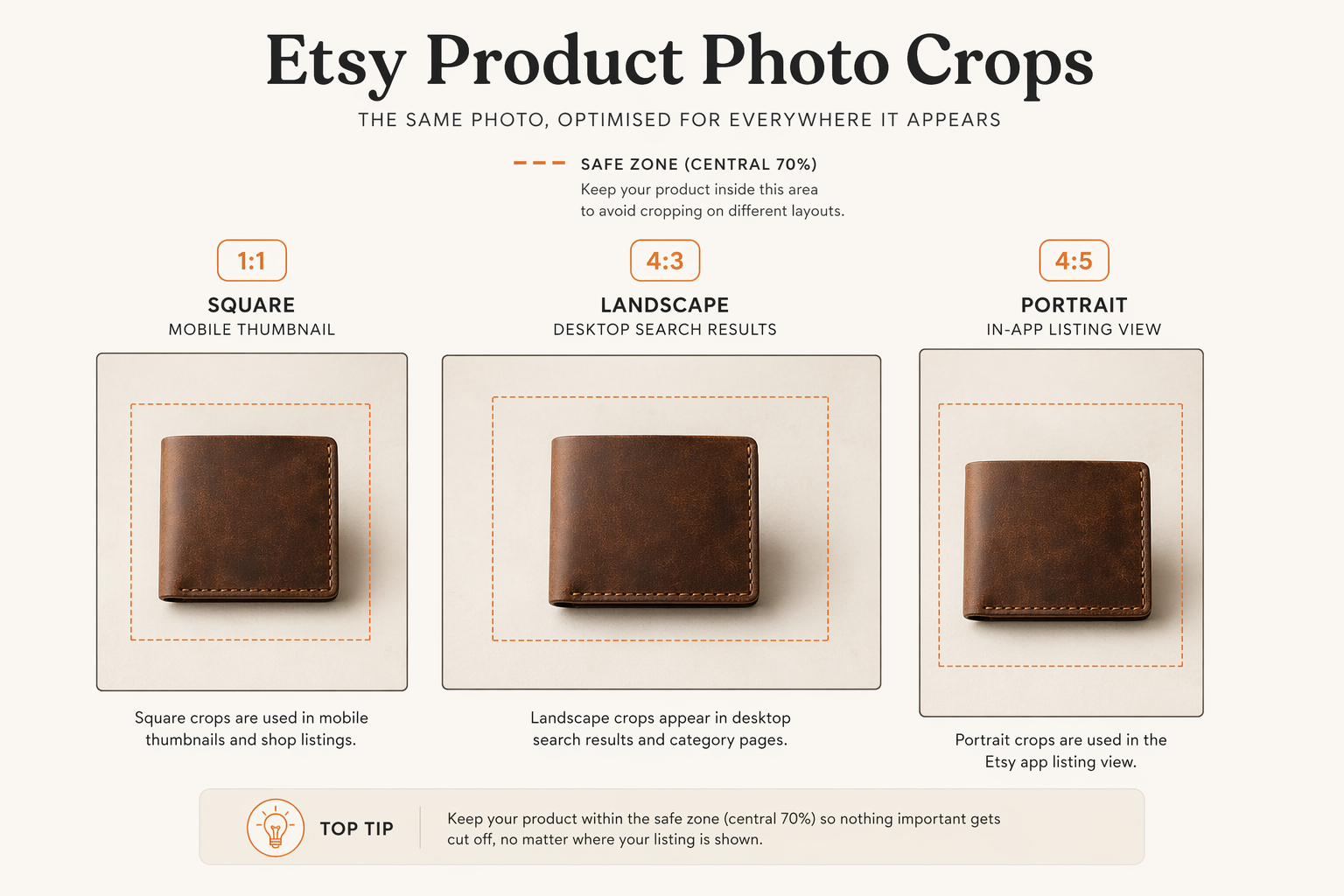
Diagram showing how the same Etsy listing photo gets cropped differently on desktop search, mobile search, and in the listing gallery, with the product centred so key details survive every crop
The 20-Photo Slot Strategy
Etsy recently increased the maximum photos per listing from 10 to 20. Most sellers still upload three. That is the single easiest competitive edge available on the platform today.
Here is what each slot should do, in order of priority. You do not need all 20 for every product — but listings with 7 or more photos consistently convert better than those with fewer.
The hero shot. Clean product on a neutral or branded background, centred, filling roughly 60-80 percent of the frame. This is the thumbnail. It decides the click.
Lifestyle shot. The product being used, worn, held, or placed in a real setting. Helps buyers picture owning it.
Scale reference. Next to a hand, a coin, a ruler, or a familiar object. Prevents returns from size surprises.
Detail shot. Close-up of texture, stitching, material, or craftsmanship. Sells the quality.
Alternate angle. Back, underside, inside, or profile view. Answers "what does it look like from the other side?"
Variations. If the product comes in multiple colours, sizes, or options, show them here.
Size guide or dimensions infographic. Text overlay with measurements. Reduces message volume from confused buyers.
Packaging shot. How it arrives. Demonstrates care and gift-readiness.
Customisation options. If the product is personalised, show example variations.
In-hand or in-use video thumbnail. A still from your 15-second listing video as a supporting frame.
Slots 11 to 20 are for deeper product families, customer photos if allowed, bundle shots, or any angle that genuinely answers a buyer question. Do not pad — every photo should add information.
The Home Setup Most Etsy Sellers Actually Need
You do not need studio strobes or a professional studio. Here is the setup that works for the vast majority of Etsy products, using equipment you either already own or can buy for well under £50.
Light
A north-facing window on a cloudy or lightly overcast day is the closest thing to a free photography studio in the UK. The cloud acts as a giant softbox. Direct sun through a window creates hard shadows and is actually worse than overcast light for most products.
If you do not have a north-facing window, diffuse a sunny one with a white bedsheet, shower curtain, or tracing paper taped to the glass. The goal is soft, even light with no harsh shadows.
Background
For small-to-medium products, a single sheet of white poster board or an A1 sheet of matte white paper curved from a table surface up the wall behind the product creates what photographers call an "infinity sweep". No visible horizon line, no corner shadows, product floating on clean white.
For textured or lifestyle shots, a piece of natural linen, raw wood, or unpainted stone work well. Keep a small, consistent set of backgrounds across your whole shop for brand consistency.
Camera
A modern phone with portrait mode is genuinely enough for 90 percent of Etsy listings. If you have a camera, even better. The camera is not the limiting factor. Light, background, and framing are.
Always use the rear camera, not the selfie camera (selfie cameras use wide-angle lenses that distort shape). Mount the phone on a mini tripod so shots stay consistent across the same product.
Reflector
A white foam board, a white towel, or a sheet of A2 white paper opposite the window bounces light back into the shadow side. For metallic or shiny products, a small piece of black card on the opposite side ("negative fill") can actually improve the photo by deepening the shadows and adding shape.
What to buy and when — kit tiers for Etsy sellers
A practical buying guide for Etsy sellers upgrading their product photography setup gradually, with the impact per pound clearly shown.
| Item | Tier | Typical Cost | What It Does | Worth Buying? |
|---|---|---|---|---|
| White poster board or A1 matte paper | Tier 1 | £3–£8 | Creates seamless infinity-sweep backdrop for small products | Essential |
| Phone with portrait mode or entry camera | Tier 1 | Free (already own) | Produces sharp, consistent product shots with the rear camera | Already Own |
| Mini tripod for phone | Tier 1 | £10–£25 | Stops camera shake, keeps framing consistent across a batch | High Value |
| 5-in-1 collapsible reflector | Tier 2 | £15–£30 | Five surfaces (white, silver, gold, black, diffuser) in one portable tool | High Value |
| Window diffuser sheet or tracing paper | Tier 2 | £5–£15 | Softens direct sun through a window into flattering light | Useful |
| Constant LED panel | Tier 3 | £70–£150 | Shoot evenings, winter, or on very dull days with consistent light | If Regular |
| Product photography lightbox (small) | Tier 3 | £40–£100 | All-in-one enclosed setup for small items like jewellery, cards, cosmetics | If Small Items |
| DSLR or mirrorless camera + macro lens | Beyond Tier 3 | £400+ | Full manual control, professional detail at close range | — |
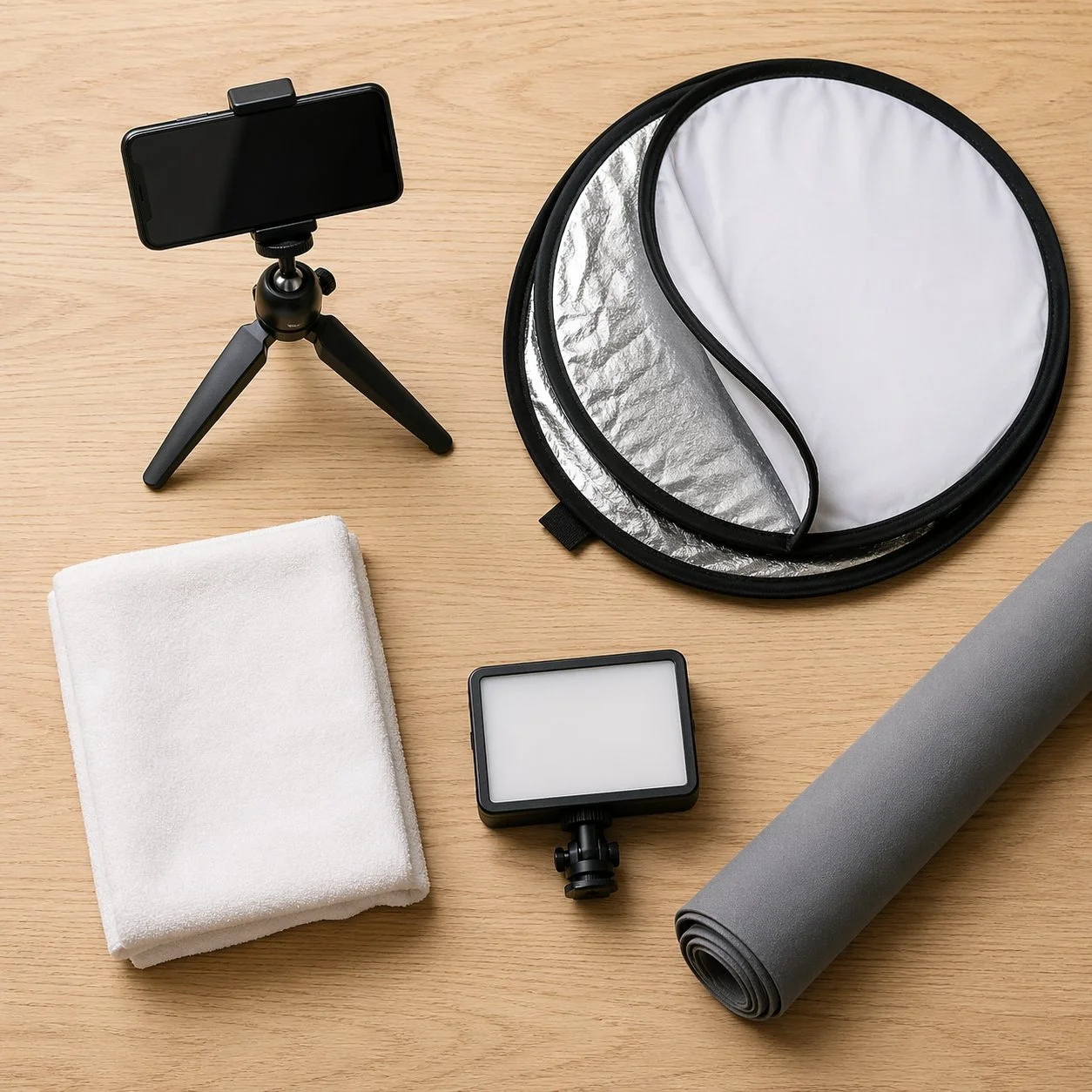
Camera Settings for Etsy Products
If you are using a phone, portrait mode handles this for you. If you are using a camera with manual control, here are the settings that work for the majority of small-to-medium products:
Aperture: f/8 to f/11 for most products. You want the entire product in sharp focus — shallow depth of field is for portraits, not products.
Shutter speed: Whatever gives a correct exposure with the camera on a tripod. 1/60 or slower is fine with no movement.
ISO: As low as the light allows, usually 100 to 400. Low ISO keeps texture crisp.
White balance: "Daylight" or "cloudy" preset, not Auto. Auto drifts between photos in the same session and wrecks your shop's visual consistency.
Focus: Single-point autofocus on the most important feature of the product. For jewellery, the clasp or focal stone. For bags, the strap or hardware.
Tripod: Always. Even in good light. A tripod lets you shoot at lower ISO for cleaner images and keeps framing consistent across a batch.
Step-by-Step: Your First Batch of Etsy Photos
How to shoot a batch of Etsy product photos — 7 steps
A complete step-by-step walkthrough from setup to upload-ready files. Allow about two hours to photograph your first batch of 10 to 20 products.
1 Pick your window and clear the space▼
Choose a room with a large window, ideally north-facing. Clear a table near the window. Turn off every indoor light — overhead, lamps, screens in the background. Mixed colour temperatures will wreck your white balance.
2 Set up your infinity sweep backdrop▼
Tape a sheet of white poster board or A1 matte paper to the table surface and curve it up against the wall behind. This creates a seamless background with no visible horizon line. Smooth out any creases and make sure the backdrop is clean.
3 Position your reflector▼
Place a white foam board, a 5-in-1 reflector, or a large sheet of A2 white paper opposite the window. This bounces light back into the shadow side of your products and keeps them evenly lit. Keep the reflector close — within two feet of the product.
4 Mount your camera on a tripod▼
Set your phone or camera on a mini tripod at the same height as your product. Frame the product in the middle 70 percent of the shot with space around all sides for cropping. Use the rear camera, never the selfie camera, and set it to portrait mode if using a phone.
5 Shoot the full sequence for each product▼
For each product, shoot at minimum: hero (centred on backdrop), scale reference (with a hand or ruler), detail shot (close-up of texture or craftsmanship), and alternate angle (back or side). Use a self-timer to avoid camera shake. Aim for 5 to 10 frames per product — storage is free.
6 Process to Etsy specs in batch▼
Import all shots into your phone's photo app or Lightroom. Crop each to 3000 x 3000 pixels (or keep 4:3 at 3000 x 2250 if you prefer landscape). Apply the same brightness, contrast, and white balance across all shots for shop consistency. Export as JPG at 80–90% quality, under 1 MB per file.
7 Upload and test at thumbnail size▼
Upload to Etsy, with your hero shot as photo 1. Use Etsy's thumbnail adjustment tool to check how each listing looks cropped as a square, landscape, and portrait. Zoom your browser to 25 percent to see how the thumbnail reads in a grid — if the product is not instantly recognisable at that size, reshoot or recrop.
Common Mistakes That Cost Etsy Sellers Sales
Uploading photos under 2000 pixels. Etsy disables the zoom function on smaller photos, and buyers interpret a missing zoom as a quality issue.
Vertical thumbnail photos. The first image becomes the thumbnail. A portrait photo loses too much on the sides when cropped to 1:1 on mobile.
Inconsistent aspect ratios within a single listing. Mixing square, landscape, and portrait makes the gallery feel chaotic when buyers swipe through.
Busy backgrounds. Radiators, plug sockets, a corner of a rug visible in frame. Your product has to fight for attention. Give it a clean background and it wins instantly.
Watermarks across the product. Etsy actively discourages watermarks and buyers find them off-putting. The platform already protects your listings — a watermark signals amateur hour.
Mixed colour temperatures. Window light plus ceiling bulb equals a photo where one side is yellow and the other is blue. Turn all indoor lights off before you shoot.
Heavy editing and filters. Buyers can tell. Over-saturated, over-sharpened, or plastic-retouched photos read as untrustworthy and make your shop look like dropshipped stock.
Using AI-generated product images. Etsy's terms require handmade listings to be represented by photos of the actual item. Using stock photos or AI-generated images risks listing removal.
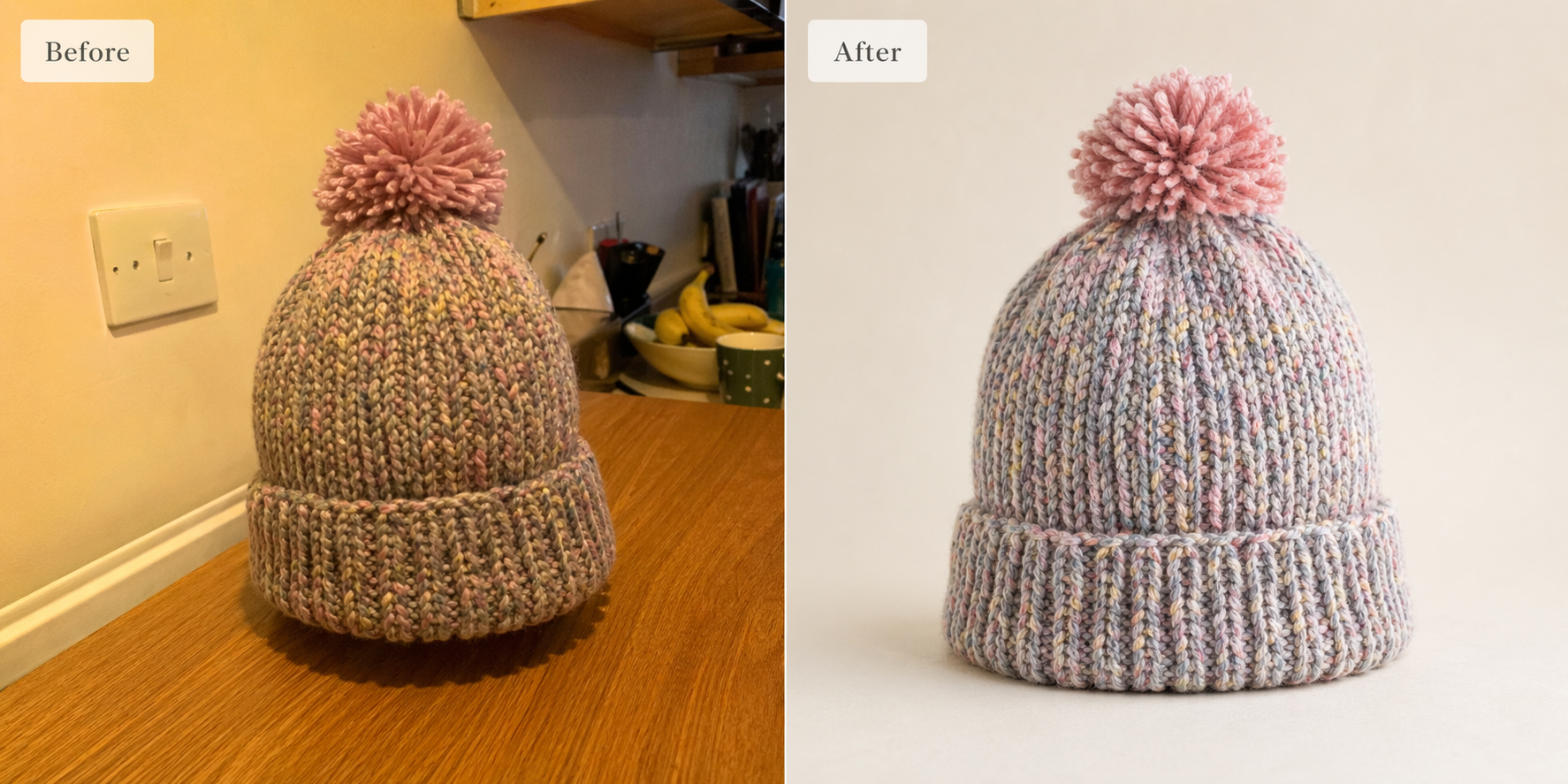
Side-by-side comparison of a poor Etsy product photo with mixed lighting and cluttered background on the left, and the same product photographed with soft window light on a clean neutral backdrop on the right
When a Photographer Is Worth Paying For
There are specific situations where hiring a professional product photographer pays for itself quickly:
Your product is complex or technical and needs multiple precise angles (watches, electronics, premium jewellery)
Your shop is scaling past 50 active listings and the volume makes DIY impractical
Your price point is above £100 per item and buyers expect studio-quality imagery
You want consistent model or lifestyle shots that require a proper set
You need photos for wholesale catalogues, lookbooks, or external marketing as well as Etsy
Expect to pay £15 to £40 per product for basic e-commerce photography in the UK, or £200 to £600 for a day rate that covers 20-40 products. For a shop making consistent sales, one professional shoot of your core range can pay for itself inside a month.
Watch This Video for a Visual Walkthrough
The video below, "DIY Product Photography for Handmade and Maker Businesses", walks through a practical home setup specifically for Etsy and maker businesses. It covers lighting placement, simple backdrops, and the camera settings discussed above, shown in a real home environment.
Frequently Asked Questions
Frequently Asked Questions
The questions Etsy sellers ask most often about getting product photos right, answered practically.
What size should my Etsy listing photos actually be?▼
Minimum 2000 pixels on the shortest side for zoom to work. Recommended 3000 x 3000 pixels for best quality when buyers zoom in. Keep file size under 1 MB per photo for reliable uploads, even though Etsy technically accepts up to 10 MB.
Can I use my phone, or do I need a proper camera?▼
A modern phone with portrait mode is genuinely enough for most Etsy listings. Always use the rear camera, never the selfie camera, and mount the phone on a mini tripod for consistent framing. The camera is rarely the limiting factor — light, background, and framing are.
Does my first photo have to be square or landscape?▼
Etsy officially recommends landscape or square for your first photo because it gets cropped into the thumbnail. A square 1:1 image at 3000 x 3000 pixels is the safest future-proof choice because Etsy displays thumbnails in different ratios across desktop, mobile, and in-app. Keep your product centred with room around it.
How many photos should I upload per listing?▼
Etsy now allows up to 20 photos per listing. Listings with 7 or more photos consistently convert better than those with fewer. Use slots strategically: hero shot, lifestyle, scale reference, detail, variations, packaging, and angle views. Do not pad — every photo should add information a buyer would want.
Does Etsy require a white background like Amazon does?▼
No. Unlike Amazon, Etsy does not require a pure white background on the first photo. Styled, lifestyle, and contextual backgrounds are actively encouraged because Etsy positions itself as a handmade and vintage marketplace where mood and character matter. That said, a clean neutral background still tends to perform best as the hero thumbnail.
Can I use AI-generated product images or stock photos?▼
No. Etsy's seller policy requires handmade listings to be represented by photos of the actual item you are selling. Using AI-generated images, stock photos, or photos from other sellers' listings can result in listing removal and shop suspension. Buyers also spot AI-generated product images quickly and it damages trust in your shop.
Should I add watermarks to protect my product photos?▼
Etsy actively discourages watermarks on listing photos because they obscure the product and look unprofessional to buyers. The platform already has systems to identify stolen images. If you are worried about image theft, focus on making your shop brand distinctive through consistent styling — that protects you better than a visible watermark ever will.
When should I hire a professional product photographer?▼
Hire a pro if your product is complex or technical (watches, electronics, premium jewellery), if your shop has more than 50 active listings, if your price point is above £100 per item, or if you need consistent model and lifestyle shots. Expect to pay £15 to £40 per product for basic e-commerce work in the UK, or £200 to £600 for a day rate covering 20 to 40 products.
Continue Learning
Continue Learning
Three related guides and one professional service page from Alan Ranger Photography to take your product work further.
Final Thought
Etsy rewards sellers who take their photos seriously. Every rule in this guide is either a hard platform requirement or a practical pattern that moves the needle on clicks and conversions. None of it requires expensive equipment. What it requires is setting aside an afternoon, setting up one consistent home lighting situation, and shooting your whole shop's products in one batch so they share a visual identity.
If you get stuck, or your product needs a more technical approach than DIY allows, consider professional commercial product photography for your core range. A clean set of 20 photos across your best-selling products is usually the best single investment an Etsy shop can make.